


Previous Post

Inside an AI Data Center: What It Actually Looks Like
A GB200 NVL72 rack draws 130kW+ and needs liquid cooling, not fans. See the rack floor, cabling, cooling, and power gear inside an AI data center.
Zettabyte Team
September 21, 2026
Inside an AI Data Center: What It Actually Looks Like
Inside an AI data center, the first thing that changes is the rack. A single NVIDIA GB200 NVL72 cabinet draws more than 130 kilowatts, over thirteen times the load of a legacy 10-kilowatt server rack (SemiAnalysis, Datacenter Anatomy Part 1, 2024). Every other thing on the floor, the cabling overhead, the cooling hardware underfoot, the power gear along the wall, the noise, follows from that single number. So what does an AI data center actually look like once someone is standing on the floor? Not a rebranded server room. A facility rebuilt from the electrical system up around chips that generate more heat per square foot than almost any commercial building on record. This walkthrough covers the rack floor, the visible cabling, the cooling and power hardware, the access controls, and exactly how the physical experience differs from a legacy enterprise data hall.
TL;DR: What does an AI data center look like on the floor? A GB200 NVL72 rack draws 130kW or more and needs direct-to-chip liquid cooling, copper NVLink cabling, and busway power distribution that a legacy 10kW rack never required (SemiAnalysis, Datacenter Anatomy Part 1, 2024; NVIDIA Developer Blog, 2024).
The Rack Floor: What a Dense GPU Rack Actually Looks Like
A GB200 NVL72 cabinet houses 72 Blackwell GPUs across 18 compute trays and nine NVLink switch trays, all liquid-cooled inside one rack that draws 130 kilowatts or more (SemiAnalysis, Datacenter Anatomy Part 1, 2024; NVIDIA Developer Blog, 2024). Nothing about that cabinet resembles the 42U air-cooled rack most enterprise IT staff grew up racking servers into.
Walk a real AI data hall and the floor plan reads in blocks, not rows of identical cabinets stretching to a vanishing point. Modern facilities break a data hall into "Pods," each running off its own dedicated electrical equipment, a design chosen specifically so the facility can scale up in standardized increments rather than one custom build at a time (SemiAnalysis, Datacenter Anatomy Part 1, 2024). Racks sit close together within a pod. That proximity is not aesthetic. It is a networking requirement we cover next.
A GB200 NVL72 rack packs 72 Blackwell GPUs, 30 terabytes of unified memory, and a 130-terabyte-per-second internal fabric into a single liquid-cooled cabinet (NVIDIA Developer Blog, 2024). At 130 kilowatts, it draws more electricity than thirteen legacy enterprise racks combined.
The Cabling You Can See: NVLink Domains and the Copper Overhead
Fifth-generation NVLink connects up to 576 GPUs in a single domain, moving 1.8 terabytes per second in and out of every GPU for a combined 1 petabyte per second of domain bandwidth (NVIDIA Developer Blog, 2024). Inside the rack, that traffic runs over copper cable cartridges connecting the compute trays to nine NVLink switch trays, not fiber.
Copper is the reason racks sit as close together as they do. At the speeds an NVLink domain runs, copper's reach is limited to roughly a couple of meters, so GPUs have to be kept physically near each other to avoid the cost, power draw, and latency of fiber optic transceivers (SemiAnalysis, Datacenter Anatomy Part 1, 2024). A legacy data hall runs fiber patch panels between distant rows because its traffic pattern tolerates the distance. An AI data hall cannot afford to.
The result overhead is a denser cable plant than a legacy hall ever needed: thick copper cartridges bridging compute trays to switch trays within the rack, then a second, separate scale-out fabric linking racks into a pod. Someone who has only ever walked a legacy colocation floor notices the cable trays first. They carry more, and heavier, copper than anything running between conventional 1U or 2U servers.
The Cooling Hardware on the Floor: Manifolds, CDUs, and Immersion Tanks
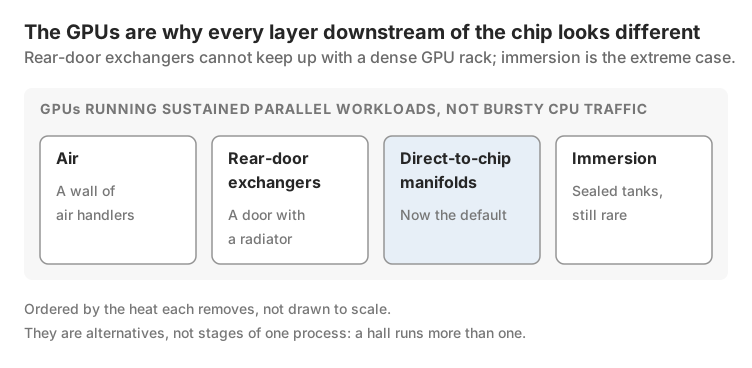
Direct-to-chip liquid cooling is now the default for any rack in the 100 kilowatt-plus class, delivered through a Coolant Distribution Unit with a typical capacity above 1 megawatt, built from a liquid-to-liquid heat exchanger, pumps, and control electronics (SemiAnalysis, Datacenter Anatomy Part 2, 2024). A CDU is what most visitors notice first on a modern AI data hall floor: a row of stainless cabinets with quick-disconnect manifolds feeding supply and return lines into each rack, rather than a wall of air handlers.
Rear-Door Heat Exchangers offer a lighter-weight alternative, cooling 30 to 40 kilowatts per rack passively, or more than 50 kilowatts with fans added in an active configuration (SemiAnalysis, Datacenter Anatomy Part 2, 2024). They read visually as an ordinary rack door with a radiator built in, unremarkable next to a manifold-fed cabinet, but they cannot keep up with a 130 kilowatt GB200 rack on their own.
Immersion cooling is the extreme case: sealed tanks of dielectric fluid that submerge entire server trays, eliminating cold plates and copper cold-loop plumbing altogether. It remains rare relative to direct-to-chip designs at hyperscale, reserved for the highest-density deployments where even a CDU-fed manifold cannot pull heat off the chip fast enough.
That escalation, from air, to rear-door exchangers, to direct-to-chip manifolds, to immersion, exists entirely because of what sits inside the rack. The compute layer itself, GPUs running sustained parallel workloads rather than the bursty CPU traffic a legacy hall was built around, is the reason every layer downstream of the chip looks different, a distinction our guide to what actually makes a facility an AI data center covers in full.
The Power Gear: Busway, PDUs, and the Generator Yard
Modern AI data halls distribute power through overhead busway, a solid bar of conducting copper, rather than the flexible cables and floor-mounted PDUs that still run most legacy facilities (SemiAnalysis, Datacenter Anatomy Part 1, 2024). Tap-off units clip onto the busway above each rack, and vertical PDUs mounted on either side of the cabinet, one for the A side and one for the B side of the facility's redundant power path, deliver the final leg into the rack.
Step outside the hall and the generator yard is the clearest visual signal of scale. A hyperscale-class AI facility commonly runs 20 or more diesel generators rated at 2 to 3 megawatts each, roughly the horsepower of a locomotive engine per unit, holding 24 to 48 hours of fuel at full load (SemiAnalysis, Datacenter Anatomy Part 1, 2024). None of that fleet runs during normal operation. It exists purely to catch the load within roughly a minute of a utility outage.
Behind the generator yard sits the substation: high-voltage transformers stepping transmission-line power down to a level the building can use. Those transformers are custom-built for each site's specific transmission characteristics and carry lead times exceeding twelve months, a bottleneck our breakdown of how hyperscale campuses actually get built walks through in full. None of that hardware exists in a legacy enterprise server room, which typically draws its power straight from a building's standard electrical service.
Security and Access: Why the Floor Is Rarely Open
AI data halls run under the same "Rated 3" redundancy framework the Uptime Institute defined for mission-critical facilities, which requires the building to stay concurrently maintainable, meaning any single component can be serviced without an outage (SemiAnalysis, Datacenter Anatomy Part 1, 2024). That operating standard is also why access stays tightly controlled: a facility engineered never to go down cannot tolerate uncontrolled foot traffic near live electrical and cooling systems.
Most people who use this hardware never see the floor at all. Hugging Face's Training Cluster as a Service lets any of its 250,000 organizations request a GPU cluster remotely, sized to a specific training run, without ever visiting the facility it runs in (Hugging Face, Training Cluster as a Service, 2025). The researcher, in most cases, interacts with a dashboard, not a badge reader.
The people who do walk the floor spend as much time watching screens as touching hardware. Fleet health dashboards built on DCGM-Exporter surface GPU utilization, temperature, and error counts, including ECC errors and XID fault codes, across every node in the cluster in real time (Hugging Face, Building Blocks for Foundation Model Training, 2026). A row of monitors showing live fleet health is as much a fixture of a modern AI data hall as the racks themselves, a detail a legacy server room walkthrough never included because no one needed to watch a handful of CPUs that closely.
What It Sounds and Feels Like: Airflow, Heat, and the Case for Liquid
Air-cooled halls are loud because fan physics punishes any attempt at quiet: fan energy consumption scales with the cube of fan speed, so cutting airflow by 10 percent only saves roughly a proportional amount of noise but a much larger 27 percent of energy, which is exactly why operators do not simply throttle fans down (SemiAnalysis, Datacenter Anatomy Part 2, 2024). Moving enough air to cool a dense rack takes a rule-of-thumb airflow of 165 to 170 cubic feet per minute per kilowatt of heat generated, and at 130 kilowatts that adds up to a wall of moving air most people have never stood next to (SemiAnalysis, Datacenter Anatomy Part 2, 2024).
Direct-to-chip liquid cooling changes that experience directly. Water, not air, carries the bulk of the heat away, so the fans that remain move far less volume. A liquid-cooled hall built around GB200-class racks runs quieter at the rack level and louder at the CDU: pumps and manifolds replace the roar of a fan wall with a lower, steadier mechanical hum.
Server inlet temperature has also shifted, and it shapes what the hall feels like on the floor. ASHRAE guidance allows dry-bulb air temperatures as high as 45°C in some server classes, and operators increasingly run above the 22°C that used to be standard specifically to cut cooling energy (SemiAnalysis, Datacenter Anatomy Part 2, 2024). A hot aisle in a modern facility, fully contained behind physical barriers to stop hot and cold air from mixing, can feel noticeably warmer than the chilled, over-conditioned server rooms most visitors expect.
How This Differs from a Legacy Enterprise Data Hall Walkthrough
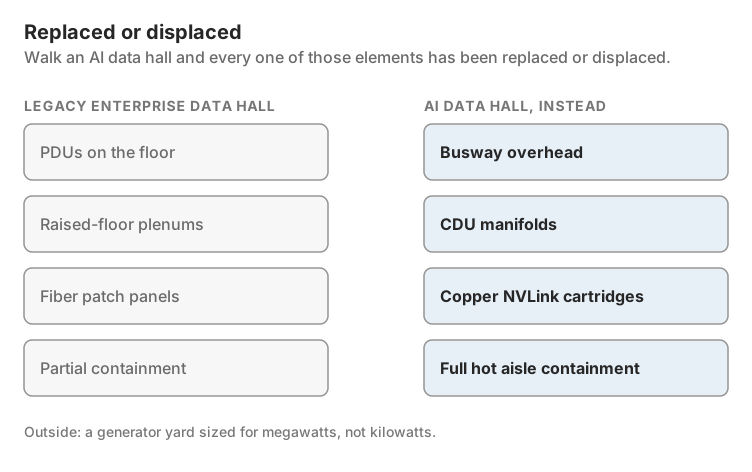
Walk a legacy enterprise data hall and the pattern is familiar: raised floor, perforated tiles feeding cold air up from below, CRAC units lining the perimeter, PDUs on the floor feeding flexible power cables into 1U and 2U servers drawing well under 10 kilowatts per rack. Containment, where it exists at all, is often partial.
Walk an AI data hall and every one of those elements has been replaced or displaced. Busway overhead instead of PDUs on the floor. CDU manifolds instead of raised-floor plenums. Full hot aisle containment instead of partial. Copper NVLink cartridges instead of fiber patch panels. A generator yard sized for megawatts, not kilowatts, standing outside.
The difference is not cosmetic. Every one of those substitutions exists because the rack in the middle of the room draws 130 kilowatts instead of 10, and that single figure cascades into a fundamentally different building.
FAQ
How loud is an AI data center data hall?
Loud, though liquid-cooled halls run quieter at the rack than air-cooled ones, because fan energy scales with the cube of fan speed and direct-to-chip cooling removes most of that fan load (SemiAnalysis, Datacenter Anatomy Part 2, 2024). What replaces the fan noise is a steadier mechanical hum from CDU pumps.
Why do AI data center racks need liquid cooling instead of fans?
A GB200-class rack draws 130 kilowatts or more, well past what airflow alone can safely remove from a single cabinet (SemiAnalysis, Datacenter Anatomy Part 1, 2024). The full explanation of why GPU workloads push power density this high lives in our guide to what an AI data center actually is.
Can visitors actually walk into a live AI data center floor?
Rarely, and almost never unescorted. These facilities run under Rated 3 "concurrently maintainable" standards that require tight control over who is near live electrical and cooling systems, and most GPU users access the hardware remotely rather than visiting it at all (SemiAnalysis, Datacenter Anatomy Part 1, 2024; Hugging Face, Training Cluster as a Service, 2025).
What cabling would you actually see on an AI data center floor versus a legacy one?
Thick copper NVLink cable cartridges connecting compute trays to switch trays within the rack, rather than the thinner fiber patch panels a legacy hall runs between distant rows (NVIDIA Developer Blog, 2024). Copper's short reach at high speed is also why the racks themselves sit closer together (SemiAnalysis, Datacenter Anatomy Part 1, 2024).
Every substitution on this floor, the busway, the manifolds, the copper overhead, the generator yard, traces back to one number: 130 kilowatts against 10. Walk the floor once with that number in mind, and the rest of the building reads as a single, consistent answer to it, with confidence.