


Previous Post

What Is a GPU Cluster?
A GPU cluster links dozens to thousands of GPUs across nodes for parallel compute. See the architecture, when you need one, and how AI training uses it.
Zettabyte Team
September 18, 2026
What Is a GPU Cluster?
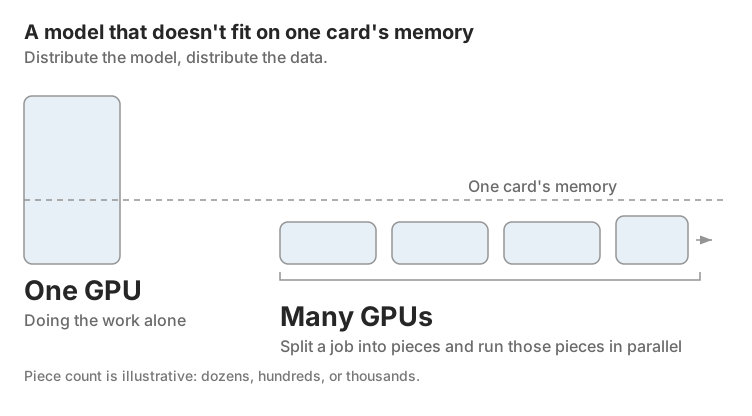
A GPU cluster is a group of servers, each holding one or more GPUs, wired together so they act as a single, much larger computer. Instead of one graphics card doing the work alone, dozens, hundreds, or thousands of them split a job into pieces and run those pieces in parallel. That's the whole idea: more GPUs working in sync beats one GPU working alone, provided the networking and software connecting them don't fall apart under load.
This matters right now because a single GPU, even a top-tier one, runs out of memory and time long before a modern AI model finishes training. A 70-billion-parameter model doesn't fit on one card's memory at all. A GPU cluster is how that constraint gets solved: distribute the model, distribute the data, and let hundreds or thousands of GPUs finish in days what one GPU would take months to attempt. Frontier labs now build single clusters exceeding 100,000 GPUs, and a cluster at that scale draws more than 150 megawatts and costs upward of $4 billion in server capital alone (SemiAnalysis, 2024).
TL;DR: A GPU cluster is multiple GPU-equipped servers (nodes) connected by high-speed networking and coordinated by orchestration software like Slurm or Kubernetes, so they process one workload in parallel. Clusters range from 2-4 GPUs for small teams to over 100,000 for frontier AI training (SemiAnalysis, 2024), and the deciding factor is usually GPU memory: if your model or dataset doesn't fit on one card, you need a cluster.
GPU Cluster Architecture: How the Pieces Fit Together
Every GPU cluster splits into two node roles, plus three supporting layers: networking, storage, and orchestration software. Miss any one of them and the "cluster" is just a rack of GPUs that happen to be plugged into the same switch.
Head Nodes vs. Worker Nodes
A cluster has one head node and any number of worker nodes. The head node is the traffic controller: it schedules jobs, tracks which worker nodes are busy, and reports cluster health, but it usually does none of the actual computing. Worker nodes are where the GPUs live and where the real work happens. Each one is a server carrying GPU accelerators, CPUs for orchestration tasks the GPU shouldn't waste cycles on, high-bandwidth memory, and a network interface card fast enough to keep up with the GPUs.
Picture a construction crew instead of a single mechanic. The head node is the foreman, calling out which worker takes which task and keeping a running tally of who's free. The worker nodes are the crew doing the lifting. Neither role works without the other.
Nodes can also be homogeneous, meaning every GPU in the cluster is the identical model and memory size, or heterogeneous, meaning the cluster mixes GPU generations or vendors. Homogeneous clusters are simpler to schedule and tune. Heterogeneous clusters show up more often in organizations that bought hardware in phases and never fully replaced the old generation.
The Networking Layer
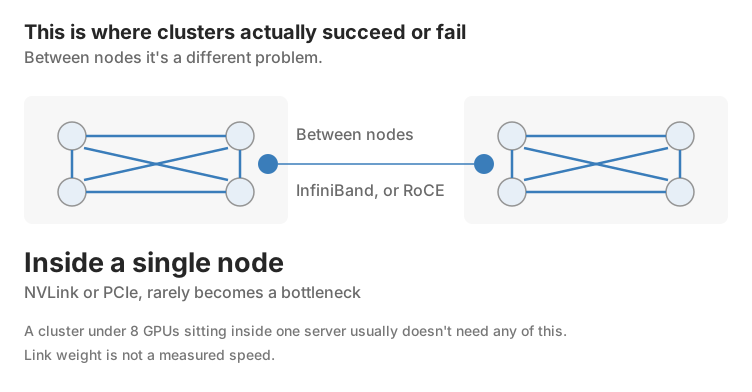
This is where clusters actually succeed or fail. If GPUs can't exchange data fast enough, adding more of them barely helps, because the cluster spends its time waiting on the network instead of computing. Inside a single node, GPUs talk over NVLink or PCIe, both fast enough that this rarely becomes a bottleneck. Between nodes it's a different problem, and this is where InfiniBand earns its reputation as the industry default for serious AI training: sub-microsecond latency and throughput up to 400 Gbps, purpose-built for exactly this job. RDMA-over-Ethernet options like RoCE compete on cost, and NVIDIA's Spectrum-X targets the same use case on a proprietary fabric.
A cluster under 8 GPUs sitting inside one server usually doesn't need any of this since NVLink or PCIe within the node is enough. The moment training spans multiple servers, inter-node networking stops being a detail and becomes the thing that decides whether the cluster performs like a cluster or like a slow single GPU with extra hardware attached.
At frontier scale the networking problem changes shape entirely. No one connects every GPU to every other GPU at full bandwidth once a cluster passes a few thousand units: the switching layers and optics required would be prohibitively expensive. Instead, operators build "islands" of GPUs with full bandwidth inside each island and oversubscribed, slower links between islands, a design SemiAnalysis documented in detail across Meta's and other hyperscalers' 100,000-GPU-class deployments (SemiAnalysis, "100,000 H100 Clusters," 2024). Reliability follows the same scaling problem in reverse. At 100,000 GPUs, even a five-year mean time to failure per network link means the first job-stopping link failure arrives in under half an hour of runtime, which is why frontier operators build hot spare nodes and fast state-reconstruction into the training loop rather than treating failure as an edge case.
Orchestration Software
Wiring GPUs together doesn't make them cooperate. That's the job of orchestration software, and two names dominate: Slurm, the workload manager that grew up in academic high-performance computing and still handles job queuing and batch scheduling better than almost anything else, and Kubernetes, the container orchestrator that scales cloud-native workloads and now runs GPU inference at most large AI shops. Ray sits alongside both, built specifically for distributed AI workloads with libraries for training, tuning, and data pipelines.
The two tools solve different problems rather than competing head-on. Slurm schedules at the job level, allocating an entire multi-node training run atomically before any task starts, which matters because a distributed training job that partially starts with some ranks running and others still waiting can deadlock or waste GPUs outright. Kubernetes takes a declarative, per-pod approach that excels at inference serving and autoscaling but needs additional layers, such as Kueue or NVIDIA's KAI Scheduler, bolted on to get the same job-level gang scheduling Slurm provides natively (Hugging Face, "Building Blocks for Foundation Model Training and Inference on AWS," 2026). That's why a meaningful share of production clusters run Slurm and Kubernetes together rather than picking one: Slurm handles the training queue, Kubernetes handles everything that looks like a service.
GPU Cluster vs. Single GPU: When You Actually Need One
One GPU is a skilled specialist working alone. A cluster is a coordinated team, and coordination costs something: more complexity, more failure points, more to configure before the first training run even starts. The decision isn't "clusters are better." It's "does this job actually need one."
Three signals say yes. First, memory: if the model's parameters don't fit in a single GPU's memory, there's no workaround that doesn't involve more GPUs. Second, time: if training on one GPU would take months rather than days, a cluster turns that timeline into something a team can actually iterate on. Third, concurrency: if you're serving a model to thousands of simultaneous users, one GPU queues requests one at a time regardless of how fast it is individually.
Most AI startups begin with 8 to 32 GPUs and scale from there as the workload demands it, not because that number is magic, but because it's usually the point where a single machine's limits show up in the timeline. Below that, a single high-memory GPU or a small multi-GPU box inside one server often gets the job done without the added networking and scheduling overhead a full cluster requires.
GPU Clusters for AI Training
Training is where clusters earn their reputation. A large language model's training run starts with raw data collection, moves through preprocessing, then training itself, and that pipeline can run for weeks or months even before counting the compute needed to actually process the tokens. GPT-3 trained on 300 billion tokens and 175 billion parameters and still took months on roughly 10,000 V100-class GPUs (Brown et al., "Language Models are Few-Shot Learners," OpenAI, 2020). Newer, larger models train faster only because the clusters training them got bigger and better networked, not because the underlying math got easier: a cluster of 100,000 H100s can deliver more than 30 times the peak throughput of the 20,000-GPU cluster that trained GPT-4, though real-world Model FLOPs Utilization of around 35% at FP8 and 40% at FP16 means only a fraction of that theoretical throughput ever becomes usable training progress (SemiAnalysis, 2024).
Fine-tuning needs far less than full pretraining, typically hours or days on tens to hundreds of GPUs instead of months on thousands, but it still benefits from a cluster's parallelism, especially with production-scale datasets. Inference, running the trained model to actually answer requests, has a different profile: it's less about raw parallel throughput per job and more about serving many requests at once without users noticing a queue.
Raw GPU count is not the same thing as usable throughput. A cluster with more GPUs than it can actually keep busy is money spent on hardware sitting idle. That gap between GPUs installed and GPUs actually contributing shows up in the industry's model FLOPs utilization and model bandwidth utilization metrics, and it's often where a cluster that looks well-specified on paper underperforms in practice. The step-by-step tuning work that closes that gap, from parallelism strategy to communication libraries, is covered in our guide to optimizing GPU clusters for LLM training.
Types of GPU Clusters and How to Get One
Beyond the homogeneous and heterogeneous split, clusters divide by where they live. On-premises clusters give an organization full control over hardware and data, at the cost of the capital and the engineering time to build and maintain them. Cloud-based clusters, run by hyperscalers or specialized neoclouds, trade that control for speed: a team can be training on rented GPUs within hours instead of months, paying per GPU-hour instead of financing a data center buildout.
Which one makes sense depends less on preference and more on how predictable the workload is. A steady, ongoing training pipeline can justify owned infrastructure. A short-term project, a fluctuating inference load, or a team that hasn't settled on its long-term GPU generation yet usually comes out ahead renting capacity instead.
Common Mistakes When Thinking About GPU Clusters
The most common mistake is treating GPU count as the only spec that matters. A 64-GPU cluster with poor interconnect can underperform a well-networked 32-GPU cluster on the same training job, because the bottleneck was never compute. It was how fast GPUs could hand data to each other. The second mistake is underestimating storage: model checkpoints, weights, and training data all have to move to every node that needs them, and a cluster with fast GPUs sitting behind slow shared storage spends its expensive hardware waiting on file reads. The third is skipping failure planning. GPU failure rates climb with cluster size, and a cluster without checkpointing loses a training run's progress the moment one card drops out mid-job, a risk that only grows as clusters push into the tens of thousands of GPUs (SemiAnalysis, 2024).
FAQ
How many GPUs are in a typical GPU cluster?
It depends entirely on the workload. Small teams often run 2-4 GPUs in a single node; most AI startups scale into 8-32 GPU clusters as training needs grow; frontier foundation model training now runs on clusters exceeding 100,000 GPUs.
What's the difference between a GPU cluster and a supercomputer?
Supercomputers are typically purpose-built, fixed installations designed for one class of problem. GPU clusters are more flexible: they can be assembled from standard servers, rented from a cloud provider, or scaled up and down as workloads change.
Do I need a GPU cluster, or is one GPU enough?
If your model fits comfortably in one GPU's memory and trains in a reasonable timeframe, a single GPU is enough. Once the model won't fit, training stretches into months, or you need to serve many concurrent users, a cluster becomes the practical option.
What software manages a GPU cluster?
Slurm and Kubernetes are the two dominant options, often deployed together, with Ray increasingly used for distributed AI-specific workloads like training and hyperparameter tuning.
Can a GPU cluster mix different GPU models?
Yes, that's a heterogeneous cluster. It works, but it complicates scheduling since different GPU generations have different memory sizes and performance characteristics that the orchestration software has to account for.